


Misfits Market Grocery App
4.3997.00 Reviews
App Specs
- Version
- 3.3.33
- Updated On
- License
- Free
- Downloads
- 100,000+
- Developer
- Misfits Market
- Categories
- Food & Drink
- Platform
- Android
Screenshots
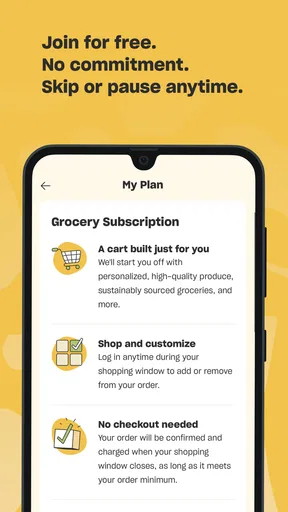
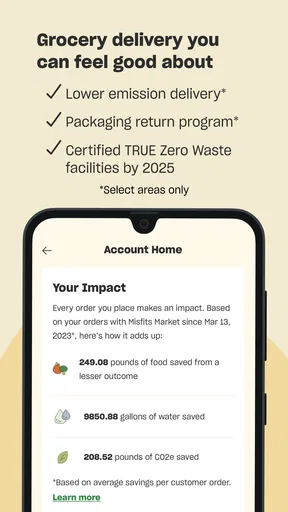
 Analysis by AppCompare
I first looked at Misfits Market as something more practical than a simple grocery catalog. It is a free Food & Drink app from Misfits Market that focuses on organic grocery delivery, and its real value depends on how well it fits into the way a household plans, checks, and receives food. For one person, that may mean arranging a weekly order from a phone. For a shared home, it also means deciding who manages the account, who checks the basket, and who is trusted to make changes.
That distinction matters because grocery shopping is rarely an individual activity for long. One person may know which vegetables are needed, another may care about pantry staples, and someone else may be the one available when a delivery needs attention. I found the app most useful when treated as the household’s ordering workspace rather than as an impulse-shopping tool. It can make organic grocery delivery easier to organize, but it does not remove the need for communication between the people eating the food.
How Misfits Market fits into a shared household
In a typical shared-home situation, one person installs the app and starts building the order while others contribute information separately. A partner might mention that breakfast items are nearly gone, a roommate may ask for a particular snack, and a parent may want more fresh produce. The app can serve as the place where the final basket is assembled, but I would still keep the household’s shopping conversation outside it unless everyone is physically looking at the same screen.
That workflow is especially helpful for households that already have a regular grocery rhythm. Instead of opening the app only when the kitchen is empty, I would use it while checking the refrigerator and pantry together. The useful habit is to separate “we need this soon” from “this would be nice to have.” That keeps the order focused and makes it easier to notice whether the basket reflects the needs of everyone sharing the delivery.
There is also a trade-off compared with walking into a supermarket. A physical shop lets two people see the same shelves, compare alternatives, and make a decision in the moment. With delivery, the person controlling the phone naturally becomes the decision-maker. That is convenient, but it can create small household misunderstandings: someone may assume an item was added, or may not notice that a preferred option was left out. I recommend showing the near-final basket to anyone who shares the groceries before placing the order.
For a single adult, this extra coordination is unnecessary, and that is where the app feels simplest. You can think through your own meals, add what suits your routine, and avoid a separate trip. For a couple, family, or group of roommates, the benefit is less about speed alone and more about creating one clear ordering moment. The app works best when everyone agrees who has the final say.
Planning the basket instead of browsing without a purpose
My strongest practical tip is to begin with meals and storage space, not with browsing. Organic grocery delivery can encourage a larger basket because the phone makes it easy to keep adding items. Before opening the app, I would write down a few planned meals, the staples that are genuinely low, and the fresh foods that can be eaten early in the delivery cycle. This reduces waste and makes the order easier to review.
Worth Reading Before You Choose

EA SPORTS FC Mobile 26 Is a Bigger Football Game, but It Takes Time

Flipboard Shows What News Apps Must Do Beyond the Feed

Switching to Android Auto Means Rethinking Your Driving Routine

Google Calendar Makes a Crowded Week Easier to Manage

Ludo King Makes the Most of the Minutes Between Plans

Baby Panda World Brings Quick Play to Modern Phones, but Its Game Library Feels Busy
Fresh food also changes the way a household should coordinate. If one person is away for several days, that person’s preferences should not automatically determine the whole order. A better approach is to consider who will actually be home to eat the more perishable items. In a shared kitchen, this small adjustment can matter more than adding another product to the basket.
I also prefer a two-pass review. On the first pass, I add the essentials without overthinking the total mix. On the second, I check quantities, duplicate items, dietary needs, and whether the order still makes sense for the household’s schedule. This is a useful safeguard when several people have been making suggestions. It is easy for a shared list to become a collection of individual wants rather than one workable grocery plan.
Account boundaries deserve attention
When an app is used on a shared device, the account boundary becomes important. I would choose one primary account holder and make that person responsible for final checkout and order review. Other household members can provide their requests, but I would avoid casually passing the logged-in phone around if there is any chance that someone could change the basket unintentionally.
This is not a criticism unique to Misfits Market; it is a normal issue with shopping apps. A grocery basket represents real household spending, so the person with access should be someone everyone trusts. If a roommate moves out, a relationship changes, or the phone is handed to another family member, the household should review who still needs access. Keeping that boundary clear prevents confusion over who placed an order and which requests were actually approved.
I would also avoid treating one shared login as a complete household-management system. The app is designed around grocery delivery, not around assigning chores, approving purchases for different people, or maintaining separate personal budgets inside one home. If your household needs strict individual spending limits, separate shopping accounts or a shared budgeting method may be a better companion. The app can handle the grocery order, but it should not be expected to replace every household process.
For a shared tablet or family phone, notifications and saved account access deserve the same care as the basket itself. Anyone who can open the app may see the current shopping activity, and anyone using the account may affect the order. I would keep the device’s general security in place and make the checkout responsibility explicit. That is a simple habit, but it makes the experience much less stressful.
Coordinating requests without turning shopping into a group project
Coordination works best when requests are specific. “We need vegetables” is less useful than “we need ingredients for two dinners and something easy for lunches.” I found that household shopping becomes more efficient when each person states the purpose of a request, especially for items that may be expensive, perishable, or difficult to share.
A practical system is to set a cutoff before the order is finalized. Until that point, everyone can suggest changes; after it, the account holder reviews and places the order. This prevents last-minute additions from becoming a source of disagreement. It also gives the person ordering enough time to check the entire basket rather than reacting to a stream of messages.
For roommates, I would go one step further and agree on how shared and personal items are separated. A household may want common produce and pantry goods, while each person buys their own snacks or specialty foods. Misfits Market can be part of that arrangement, but the app itself should not be treated as proof of who owes what. A note, spreadsheet, or payment app may still be necessary for fair cost sharing.
Families may have a different challenge. A child can help choose foods, but I would keep the ordering account with an adult who understands the household budget and delivery plan. That lets younger family members participate in meal planning without giving them responsibility for purchases they may not fully understand. The app’s Everyone content rating makes it broadly suitable to view, but an age rating is not the same thing as independent purchasing guidance.
Another useful habit is to read the basket aloud before checkout when several people are involved. It sounds old-fashioned, but it catches the mistakes that silent scrolling misses. Someone may notice that a requested item is absent, that two people added the same staple, or that the order contains more fresh food than the household can use. This is one of the few minutes of coordination that can genuinely prevent waste.
Trust, age, and who should control the order
Because the app is rated for Everyone, I would not see a problem with a child or teenager looking through it with an adult. Browsing food options can be a good way to teach planning, compare needs with wants, and involve younger household members in meals. The important boundary is that the adult remains responsible for account access, spending decisions, and the final order.
That arrangement also works for older relatives who may prefer help with digital shopping. A family member can sit beside them while they choose foods, while the person managing the account handles the technical steps. In my view, this is better than silently taking over the entire process because it preserves the shopper’s preferences and makes mistakes easier to spot.
Trust matters among adults too. If a partner or roommate has access to the account, both people should understand whether they are allowed to edit the basket or only suggest items. A shared device can make those roles unclear. I would never assume that access to the app means automatic permission to place an order, particularly when the account is connected to a household payment method.
The app’s age context is therefore reassuring for general use, but it does not answer the practical household questions. Who checks the total? Who confirms the delivery details? Who decides whether an alternative is acceptable? Those decisions belong in the home’s agreement, not in assumptions about the app. Misfits Market can support the process, but trust still comes from the people using it.
What the app does well compared with ordinary grocery shopping
The clearest advantage is convenience. When I want to plan groceries without driving to a store, a delivery-focused app is easier to fit around work, study, or household duties. The organic emphasis also gives it a more specific identity than a general shopping app. Someone who already prioritizes organic groceries may appreciate starting in a space built around that preference instead of searching through a broad supermarket catalog.
Compared with a supermarket website, the experience can feel more focused. A large retailer may offer a wider range of brands and local store options, but that breadth can make browsing slower and less intentional. Misfits Market is more appealing when the goal is to arrange a considered grocery delivery rather than compare every possible version of an item.
Compared with a physical store, the app is better for repeat planning and worse for immediate inspection. In a shop, I can judge produce directly, notice an unexpected substitute, and change my mind at the shelf. In an app, I am making decisions from the information presented on the screen and trusting the delivery process to complete the plan. That convenience comes with less hands-on control.
It is also different from a meal-planning app. A meal planner may be better if the main problem is deciding what to cook, while Misfits Market is more relevant once I know what groceries I want to obtain. If your household struggles with both meal ideas and shopping, you may need a separate planning method. I would not use this app alone as a complete nutrition, recipe, or household-budget system.
Where the experience can become frustrating
The main friction is the gap between browsing and household agreement. The app can make adding items easy, but that does not mean the final order is automatically sensible. Shared use introduces the possibility of duplicate requests, forgotten preferences, and uncertainty about who is paying for personal items. Those are manageable problems, but they require a routine.
Delivery also demands more forward planning than a quick supermarket visit. If dinner is needed immediately, a local store or another rapid shopping option may be the better choice. I would use Misfits Market for planned grocery replenishment, not as my only solution for urgent ingredients. The more carefully the household plans its meals and storage, the more the delivery model makes sense.
The app may also be a poor fit for someone who wants maximum local choice, exact in-person selection, or a very narrow shopping list that can be completed in minutes at a nearby store. Delivery is not automatically more efficient for every basket. If the order is tiny, the trip is short, or the household needs an item immediately, the usual alternative may involve less effort overall.
Another limitation is that shared-device convenience can blur responsibility. A family may enjoy having one phone for grocery shopping, but that arrangement becomes risky if nobody knows who is reviewing the basket. I would call this a household-design issue rather than an app failure, yet it affects the real experience enough to plan for it before relying on the service.
Technical details and everyday suitability
Misfits Market is free to install, and its current version is 3.3.33. It runs on Android 7.0 or later, which makes it accessible on many older Android phones as well as newer devices. That is useful for households that share an older tablet or keep a spare phone in the kitchen, although the device still needs to be comfortable enough for reading product information and reviewing an order.
The app was released on March 24, 2022, and has built a visible user base, with over one hundred thousand installs. Its average rating is 4.4 from around 4.4 thousand ratings, alongside close to one thousand written reviews. I read those figures as a sign that the app has earned meaningful user attention, not as a guarantee that every household will have the same delivery experience.
Those numbers are helpful context, but my decision would still come down to shopping habits. A household that values organic groceries, can plan ahead, and has one trusted account manager is likely to get more from it. A household that needs instant purchases, highly individualized accounts, or constant in-person selection may be happier with a local supermarket or a broader grocery service.
My household verdict
I would recommend Misfits Market to a friend who wants a more organized route to organic grocery delivery and is willing to plan before placing an order. Its strongest use is not random browsing; it is a deliberate household routine in which one person gathers requests, everyone checks the basket, and one trusted adult completes the purchase.
For shared homes, I would set the rules before the first order: decide who owns the account, agree on a request deadline, separate shared groceries from personal items, and review the basket together. Those steps make the experience clearer for couples, roommates, and families. They also help younger users participate safely without confusing browsing access with purchasing authority.
I would skip it when I need groceries immediately, when I want to inspect every item myself, or when my household requires strict individual budgets and separate permissions. In those situations, a physical store, a general supermarket app, or a separate expense-sharing system may be more suitable.
Overall, I see Misfits Market as a useful grocery-delivery tool with a clear organic focus, especially for people who can turn shopping into a planned weekly task. The app does not solve household coordination by itself, but it gives that coordination a practical center. Used with sensible account boundaries and a quick final review, it can make shared grocery shopping calmer and more predictable.
Pros
- Discounted prices on surplus and organic groceries
- Convenient recurring grocery delivery options
- Personalized shopping helps reduce browsing time
- Supports farmers and reduces food waste
- Easy-to-use app with flexible order management
Cons
- Delivery availability varies by location
- Minimum order requirements may apply
- Fresh produce quality can vary between shipments
- Popular products may sell out quickly
- Packaging can be excessive for smaller orders
FAQs for Misfits Market Grocery App
What is the Misfits Market Grocery app?
Misfits Market Grocery is a shopping app for ordering groceries and household products online, with a focus on discounted items that may be surplus, overstocked, or cosmetically imperfect. After installing the app, users can browse available products, add them to a scheduled order, and manage delivery details from their phone. Product availability and selection can change frequently depending on location and inventory.
How does shopping and ordering work in Misfits Market Grocery?
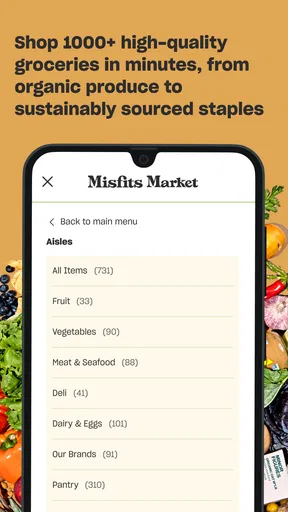
The app lets you create an account, enter your delivery address, and browse categories such as produce, pantry staples, meat, seafood, dairy, snacks, and household goods. Items are added to a shopping cart during an available ordering window, after which you review substitutions, delivery information, and the final price. Because inventory changes regularly, some products may sell out before checkout or before the order is processed.
Where does Misfits Market Grocery deliver, and are there delivery fees?
Delivery availability depends on your address, since Misfits Market does not serve every location in the same way. The app normally checks eligibility when you enter your ZIP code or delivery details. Fees, minimum order requirements, and free-shipping thresholds can vary by region and account status, so it is important to review the checkout screen carefully. Taxes, service charges, and promotional conditions may also affect the final total.
Can I modify or cancel a Misfits Market Grocery order after placing it?
Orders can generally be edited or canceled only before the applicable cutoff time shown in the app. Once the order enters processing, changes may no longer be available because products are being selected, packed, or shipped. Open the order-management section as soon as possible if you need to remove an item, change delivery instructions, or cancel. Always check the confirmation screen and the app’s current cancellation policy for your specific order.
What should I do if groceries arrive damaged, missing, or different from what I ordered?
If an item arrives damaged, spoiled, missing, or appears to be an incorrect substitution, use the app’s help or customer-support section to report the problem promptly. Take clear photographs when appropriate and include the order number, product name, and a short explanation. Resolution options may include a refund, account credit, or another adjustment, depending on the issue and the company’s current policy. Perishable products should be inspected soon after delivery.


